
PhotoShare Frame v2
SimplySmart Home by SwitchmateHouse & Home
4.81.55K Reviews
- Version
- 4.0.15
- Installs
- 100.00K
- Age Rating
- Everyone
Screenshots


Our Review of PhotoShare Frame v2
 Analysis by Appyee
Most digital photo frames are easy to understand in theory: choose a picture, send it somewhere, and let the frame display it. In practice, the useful question is whether that process feels natural for the people actually involved. PhotoShare Frame v2 is built around that simple handoff. It is a free House & Home app from SimplySmart Home by Switchmate that lets me send photos to a PhotoShare Frame, and its value becomes clearest when several people want to contribute pictures to one shared display.
I see it as a companion rather than a complete photo-management service. The app does not try to replace my phone gallery, cloud storage, or a social network. Its job is narrower: move selected memories from a mobile device to a compatible PhotoShare Frame. That focused purpose is also its main strength. I do not have to turn a family photo update into a complicated editing project.
The app has a 4.8 average from around four thousand ratings, with roughly one and a half thousand written reviews and over one hundred thousand installs. Those figures suggest that the basic idea is landing well with many users, but they should not be mistaken for a guarantee that every household will have the same experience. The frame itself, the people sending images, and the quality of the chosen photos all influence the final result.
From a phone photo to a shared display
I find the most useful way to judge this workflow is to follow one picture from the phone to the room where it will be seen. That makes it easier to separate the app’s focused role from the frame itself, and to spot the small choices—like selecting a clear, well-composed image—that shape the shared display.
The starting condition: a frame that needs better pictures
A realistic starting point is a PhotoShare Frame already placed in a living room, hallway, office, or a relative’s home. The display may be working perfectly, but its usefulness depends on receiving fresh images. Without an easy contribution process, the frame can quickly become a forgotten decoration showing the same small set of pictures.
This is where the app makes sense. Instead of asking the frame owner to collect photos manually, I can use my phone as the starting point and send a picture directly toward the shared display. That changes the frame from a static object into an ongoing family project. Someone visiting a new place, attending a birthday, or capturing an ordinary weekend moment can contribute without needing to be physically beside the frame.
The best candidates are photos that already have a clear purpose on a larger screen: a child’s recent activity, a family gathering, a holiday snapshot, or a picture intended for someone who does not spend much time on social media. I would not treat this as a replacement for keeping original images safely stored elsewhere. The frame is the destination for viewing, not the place I would rely on as my only archive.
That distinction matters because it prevents a common mistake. If I begin by selecting every image in my camera roll, the process becomes cluttered and the frame becomes less meaningful. A small, deliberate selection usually works better. I prefer to choose images that are bright, easy to recognize, and still understandable when viewed from across a room.
Step one: choosing the right image before sending it
The first useful habit is to inspect the picture before transferring it. A phone photo can look fine in a hand and still be a poor frame image if the important subject is near an edge, the lighting is dim, or several people are too small to recognize. PhotoShare Frame v2 is most helpful when I make that judgment before the handoff rather than expecting the app to rescue every image.
I also think about the audience. A private phone gallery can contain screenshots, duplicates, documents, and pictures that only make sense to me. A shared frame has a different standard. If several relatives see the display, I choose images that are comfortable for the whole household and avoid sending a batch that feels like an unfiltered camera roll.
A practical workflow is to create a temporary selection in the phone’s gallery first, then open the frame app and send only that group. This separates photo organization from delivery. It also gives me a chance to notice duplicates and remove images with awkward crops. That small pause is one of the most valuable improvements a user can make, because the app’s simplicity is designed for sending, not for extensive curation.
Step two: making the handoff
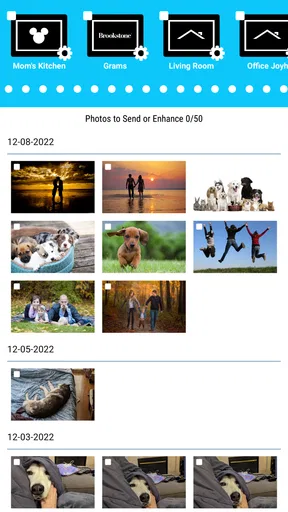
The central action is straightforward: I use the app to send photos to the PhotoShare Frame. The experience is appealing because it keeps the destination in view. I am not uploading a picture to a broad platform and hoping the intended person notices it; I am directing it toward a particular household display.
This direct purpose is especially useful for relatives who are comfortable looking at a frame but less comfortable managing online albums. One person can handle the technical side while others simply enjoy the result. In that arrangement, the app becomes a quiet bridge between different levels of digital confidence.
The handoff also works well for shared occasions. Imagine a family gathering where several people take pictures. Rather than waiting until everyone returns home and sends images through separate messages, each contributor can prepare a few strong photos and pass them to the frame workflow. The result is less dependent on one person remembering to download attachments, rename files, or copy them to removable storage.
That convenience has a trade-off: the app is valuable only when the destination is a PhotoShare Frame. If I am trying to send images to a television, a generic smart display, a shared cloud album, or a friend’s phone, this is the wrong tool. Its focused design is an advantage for the intended setup and a limitation everywhere else.
Step three: coordinating people around the frame
The most interesting part of the workflow is not the tap used to send a picture; it is the coordination around it. A frame in a shared home can have several informal contributors. One person may own the frame, another may live nearby, and others may contribute from elsewhere. Before using the app regularly, I would agree on a simple household routine: who sends photos, what kinds of pictures are welcome, and how often the selection should be refreshed.
That conversation avoids a subtle problem. When sending is easy, people can contribute too freely. A frame intended to show meaningful memories can become a stream of near-identical images. I get better results when contributors send a few carefully chosen photos rather than treating the display as an automatic mirror of their phone.
There is also a useful distinction between the sender and the viewer. The person using the app may not be the person standing in front of the frame. That means I judge success by the recipient’s experience, not only by whether my own phone reports that an action completed. A good workflow includes checking the physical frame later and asking whether the images are appearing as expected.
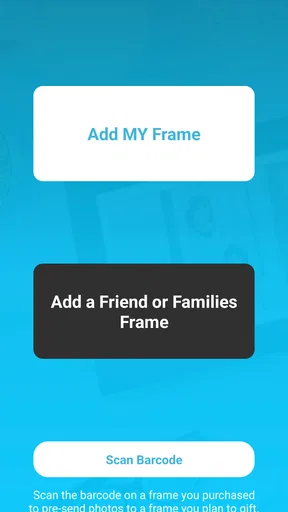
For a gift, this handoff can be particularly practical. I can help prepare the frame and then continue contributing pictures after it has been placed in someone else’s home. The recipient does not need to become an expert in photo transfers just to keep the display current. However, the arrangement works best when everyone understands which frame is the intended destination and who is responsible for keeping contributions appropriate.
What the finished result feels like
When the process goes well, the payoff is simple and tangible: a phone photo becomes part of a physical display that people can see during ordinary life. That is different from sending an image in a chat, where it may be viewed once and then buried under later messages. The frame gives selected pictures a more visible place in the home.
I like this outcome for families that want a low-pressure way to stay connected. A grandparent can see new pictures without navigating a social feed. A household can keep recent memories visible without printing them. A workplace or shared space can use the frame for a rotating set of personal images, provided the contributors agree on what belongs there.
The result is also more personal than a generic slideshow because the content comes from people connected to that particular frame. The app does not need a complicated feature set to create that feeling. Its role is to reduce the distance between the person holding the phone and the people looking at the display.
Still, I would keep expectations realistic. The app sends photos to the frame; it does not transform an ordinary image into a professionally designed presentation. The final impression depends on the frame’s physical display, the selected pictures, and the surrounding room. If the source images are poorly composed or too dark, the app cannot change the fact that they may look weak when displayed.
Where the flow can break
The first possible point of friction is compatibility. This is not a universal photo-transfer utility. It is specifically tied to a PhotoShare Frame, so someone shopping for a flexible app that works across many brands should look elsewhere. The narrow destination is clear, but it means I would confirm that the household already uses the intended frame before building a routine around the app.
The second issue is the quality of the handoff between people. If the frame owner expects a constant stream of pictures while contributors assume someone else is sending them, the display can become stale. That is not necessarily a software fault, but it is a real ownership problem. A short agreement about contributors and timing prevents the app from being installed once and then forgotten.
Another weakness is the temptation to send without reviewing. Because the basic task is so focused, I can move too quickly and choose duplicates, accidental screenshots, or images that do not suit a shared room. My solution is simple: select from a prepared album, send a small batch, and check the result on the physical frame before repeating the process.
Users should also consider whether their preferred workflow begins on a phone at all. People who already organize everything through a desktop photo library, printed albums, or a broad cloud service may find a dedicated frame app less convenient than their existing system. In that situation, the app is not automatically an upgrade; it adds value only if direct contributions to the PhotoShare Frame are the desired outcome.
The app’s age rating is Everyone, which fits its household-oriented purpose. I would still apply ordinary judgment to shared content, especially when several family members or visitors can see the display. A general audience rating does not remove the need to curate personal photos thoughtfully.
Small habits that make the workflow better
My first recommendation is to treat the frame as an edited window rather than a backup. Keep originals in the phone’s normal photo storage, and send only the images that deserve a place in the shared rotation. This protects the meaning of the display and makes future updates easier to manage.
Second, I would use the app after an event rather than during every moment of it. Taking pictures first and selecting later produces a cleaner result than sending while distracted. It also reduces the chance of contributing several nearly identical shots or an image where someone is blinking.
Third, I would establish a contributor rule for group occasions: each person sends their strongest few images, not every image they captured. This creates a useful balance between variety and visual noise. It also makes the frame feel collectively maintained rather than controlled by whoever happens to use the app most often.
Fourth, I would test the complete path with one unimportant photo before preparing a large update. That confirms that I am working with the intended frame and lets me notice any point where the recipient needs help. A small trial is much easier to correct than a large batch sent to the wrong destination or prepared without considering how it will look in the room.
Finally, I would review the display from the viewer’s distance. A picture that looks attractive on a phone may lose its impact when reduced to a room-scale glance. Strong subjects, clear faces, and uncluttered backgrounds usually make better shared-frame images than technically detailed photos whose meaning depends on zooming in.
Who should use it, and who should skip it?
I think this app is a good fit for households that already have a PhotoShare Frame and want an uncomplicated way to keep it current. It is also suited to families spread across different homes, especially when one person can manage the sending while another enjoys the finished display. The free price lowers the barrier to trying that workflow, and the Everyone age rating makes the product easy to consider for a general household.
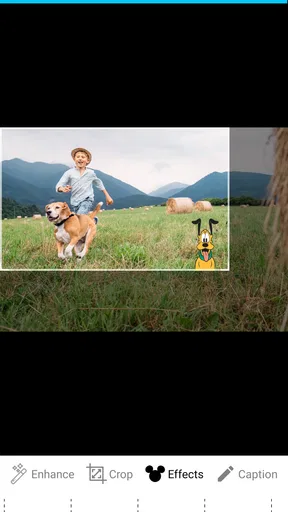
It is less suitable for someone who wants advanced photo editing, extensive album management, or one app that controls displays from multiple manufacturers. It is also a poor match for users who do not want a dedicated physical frame or who already have a smooth process through a broader cloud-photo platform. In those cases, the focused design may feel restrictive rather than convenient.
The developer, SimplySmart Home by Switchmate, has kept the concept easy to explain: send photos to a PhotoShare Frame. The current version is 4.0.15, and the app supports devices running Android 5.1 or later. Those details make it accessible to many older Android phones, although I would still think about the complete household setup rather than judging compatibility from the phone alone.
My final take after following the whole path
PhotoShare Frame v2 succeeds when the goal is specific: take a chosen photo on a phone and move it into a shared PhotoShare Frame experience. I appreciate that it does not bury that purpose under unrelated tools. The strongest part is the social handoff, where a contributor can help keep another person’s physical display fresh without asking the viewer to manage complicated technology.
Its limitations are equally clear. It depends on the PhotoShare Frame ecosystem, relies on people to curate responsibly, and does not remove the need to check how images look in the real room. Users expecting a universal gallery, a full backup system, or sophisticated editing should choose a broader alternative instead.
For the right household, though, I would recommend trying it. Start with one carefully selected image, confirm the complete journey from phone to frame, and then agree on a sensible contribution routine. The app is at its best when it turns a small digital action into a visible shared memory. That is a modest promise, but in everyday use it can be genuinely useful.
Verdict
Strengths of PhotoShare Frame v2
- Simple setup for displaying photos on a compatible digital frame.
- Supports automatic photo rotation for a continuously changing slideshow.
- Useful for sharing images remotely with family members.
- Clean interface makes basic photo management easy to understand.
- Can turn an unused tablet or phone into a dedicated photo display.
Limitations of PhotoShare Frame v2
- Compatibility may vary between devices and frame models.
- Requires a stable internet connection for remote photo sharing.
- Slideshow customization options may be limited for advanced users.
- Background operation can increase battery consumption on mobile devices.
- Privacy depends on how securely shared photos and account access are managed.
Similar Picks in This Category
View All
Universal TV Remote Control
CodeMatics Media Solutions3.9

AlfredCamera Home Security app
Alfred Systems Inc.4.7

Planner 5D: AI Home Design
Planner 5D4.5

Universal Tv Remote-Cast to TV
One Music Player4.1

Zillow: Homes for Sale & Rent
Zillow Group4.8

99acres Buy/Rent/Sell Property
infoedge.com4.3
Frequently Asked Questions
What is PhotoShare Frame v2 and what can it do?
PhotoShare Frame v2 is a digital photo-frame application designed to display and share pictures on compatible devices. During testing, its main appeal was the ability to organize selected images into a slideshow rather than manually opening each file. It is especially useful for families, events, offices, or anyone who wants to turn a spare phone or tablet into a simple rotating photo display.
How do I add or share photos in PhotoShare Frame v2?
After installing the app, you generally need to grant access to your photos and choose the images or albums you want to display. Depending on the supported sharing method, photos may be transferred from another device or selected from local storage. Before using it, check that both devices are connected as required and that the app has permission to access the relevant media folders.
Does PhotoShare Frame v2 require an internet connection?
PhotoShare Frame v2 may work with locally stored photos without a continuous internet connection, but some sharing or synchronization features can depend on the app’s supported connection method. In practical use, performance is also affected by Wi-Fi quality, device compatibility, and background restrictions. If you plan to share pictures remotely, confirm the connection requirements before relying on the app.
Is PhotoShare Frame v2 compatible with every Android or iPhone?
No application can be assumed to work identically on every Android or iOS device. Compatibility depends on the operating-system version, screen hardware, available storage, permissions, and whether the phone or tablet supports the app’s required sharing features. Check the official store listing for the current minimum requirements, and install updates if the app behaves unexpectedly on your device.
Is PhotoShare Frame v2 safe to use, and what permissions does it need?
The app may request access to photos, files, local network connections, notifications, or other functions needed for displaying and sharing images. These permissions should be reviewed before accepting them. Only grant access that matches the app’s purpose, download it from an official store, and avoid using sensitive pictures if you are unsure how images are transmitted, stored, or shared.
